
PostgreSQL ASCII() function
ASCII() function
The PostgreSQL ASCII function is used to obtain the ASCII code of the first character in a given string. This function is valuable for various text processing tasks where understanding or manipulating the underlying numerical representation of characters is necessary.
Uses of ASCII() Function
- Character Encoding: Determine the ASCII code of characters for encoding and decoding processes.
- Data Validation: Validate text data by checking the ASCII values of characters.
- Sorting and Comparison: Use ASCII values for custom sorting or comparison operations.
- Text Analysis: Analyze the character composition of strings by examining their ASCII values.
- Debugging: Identify non-printable or special characters in strings by their ASCII codes.
- String Manipulation: Convert or replace characters based on their ASCII values for advanced string manipulation.
Syntax:
ascii(<string>)
PostgreSQL Version: 9.3
Visual Presentation of PostgreSQL ASCII() function
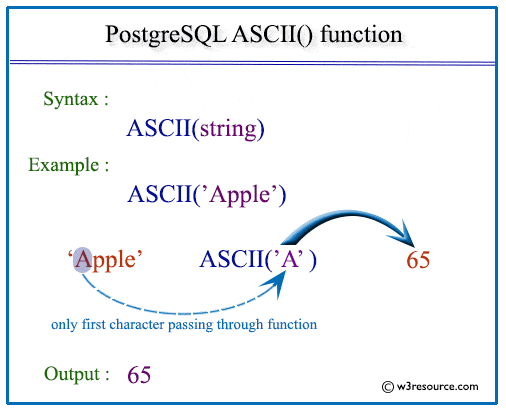
Example: PostgreSQL ASCII() function :
In the following example, PostgreSQL ascii function returns the code of the first character of the given string.
SQL Code:
SELECT ascii('w3resource') AS "ASCII of first character";
Output:
 ASCII of first character
--------------------------
                      119
(1 row)
PostgreSQL UPPER() function using Column :
Sample Table: employees.
 employee_id | first_name  |  last_name  |  email   |    phone_number    | hire_date  |   job_id   |  salary  | commission_pct | manager_id | department_id
-------------+-------------+-------------+----------+--------------------+------------+------------+----------+----------------+------------+---------------
         100 | Steven      | King        | SKING    | 515.123.4567       | 1987-06-17 | AD_PRES    | 24000.00 |           0.00 |          0 |            90
         101 | Neena       | Kochhar     | NKOCHHAR | 515.123.4568       | 1987-06-18 | AD_VP      | 17000.00 |           0.00 |        100 |            90
         102 | Lex         | De Haan     | LDEHAAN  | 515.123.4569       | 1987-06-19 | AD_VP      | 17000.00 |           0.00 |        100 |            90
         103 | Alexander   | Hunold      | AHUNOLD  | 590.423.4567       | 1987-06-20 | IT_PROG    |  9000.00 |           0.00 |        102 |            60
         104 | Bruce       | Ernst       | BERNST   | 590.423.4568       | 1987-06-21 | IT_PROG    |  6000.00 |           0.00 |        103 |            60
         105 | David       | Austin      | DAUSTIN  | 590.423.4569       | 1987-06-22 | IT_PROG    |  4800.00 |           0.00 |        103 |            60
         106 | Valli       | Pataballa   | VPATABAL | 590.423.4560       | 1987-06-23 | IT_PROG    |  4800.00 |           0.00 |        103 |            60
         107 | Diana       | Lorentz     | DLORENTZ | 590.423.5567       | 1987-06-24 | IT_PROG    |  4200.00 |           0.00 |        103 |            60
         108 | Nancy       | Greenberg   | NGREENBE | 515.124.4569       | 1987-06-25 | FI_MGR     | 12000.00 |           0.00 |        101 |           100
         109 | Daniel      | Faviet      | DFAVIET  | 515.124.4169       | 1987-06-26 | FI_ACCOUNT |  9000.00 |           0.00 |        108 |           100
		 ..................
         206 | William     | Gietz       | WGIETZ   | 515.123.8181       | 1987-10-01 | AC_ACCOUNT |  8300.00 |           0.00 |        205 |           110
If we want to display the employee_id, first name, ASCII value of first letter of first_name and ASCII value of the 1st letter of first_name after convert it in lower case for those employees who belong to the department which department_id is 100 from employees table , the following SQL can be executed:
SQL Code:
SELECT employee_id,first_name,
ascii(first_name) "ASCII value of first character",
ascii(lower(first_name)) "ASCII value of first character"
FROM employees
WHERE department_id=100;
Output:
 employee_id | first_name  | ASCII value of first character | ASCII value of first character
-------------+-------------+--------------------------------+--------------------------------
         108 | Nancy       |                             78 |                            110
         109 | Daniel      |                             68 |                            100
         110 | John        |                             74 |                            106
         111 | Ismael      |                             73 |                            105
         112 | Jose Manuel |                             74 |                            106
         113 | Luis        |                             76 |                            108
(6 rows)
PREV : UPPER function
NEXT : BTRIM function