
SQL GROUP BY clause
GROUP BY clause
The usage of SQL GROUP BY clause is, to divide the rows in a table into smaller groups.
The GROUP BY clause is used with the SQL SELECT statement.
The grouping can happen after retrieves the rows from a table.
When some rows are retrieved from a grouped result against some condition, that is possible with HAVING clause.
The GROUP BY clause is used with the SELECT statement to make a group of rows based on the values of a specific column or expression. The SQL AGGREGATE function can be used to get summary information for every group and these are applied to an individual group.
The WHERE clause is used to retrieve rows based on a certain condition, but it can not be applied to grouped result.
In an SQL statement, suppose you are using GROUP BY, if required you can use HAVING instead of WHERE, after GROUP BY.
Syntax:
SELECT <column_list>
FROM < table name >
WHERE <condition>GROUP BY <columns>
[HAVING] <condition>;
Parameters:
| Name | Description |
|---|---|
| table_name | Name of the table. |
| column_list | Name of the columns of the table. |
| columns | Name of the columns which will participate in grouping.. |
Pictorial Presentation of Groups of Data
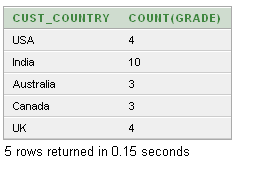
Some important questions related to the SQL GROUP BY clause:
What is the purpose of the SQL GROUP BY clause?
Can you use multiple columns in the GROUP BY clause?
What is the difference between WHERE and HAVING clauses when used with GROUP BY?
Can you sort the result set using columns that are not included in the GROUP BY clause?
What happens if you use a column in the SELECT list that is not included in the GROUP BY clause?
Can you use aliases in the GROUP BY clause?
What is the order of execution for clauses in a SQL query with GROUP BY?
How do you include aggregated values in the result set along with grouped columns?
Can you use aggregate functions without the GROUP BY clause?
What are some common mistakes to avoid when using the GROUP BY clause?
Using GROUP BY with Aggregate Functions
- The power of aggregate functions is greater when combined with the GROUP BY clause.
- The GROUP BY clause is rarely used without an aggregate function.
SQL GROUP BY with COUNT() function
The following query displays number of employees work in each department.
Sample table: employees
employee_id  first_name  last_name   email       phone_number  hire_date   job_id      salary      commission_pct  manager_id  department_id
-----------  ----------  ----------  ----------  ------------  ----------  ----------  ----------  --------------  ----------  -------------
100          Steven      King        SKING       515.123.4567  6/17/1987   AD_PRES     24000                                   90
101          Neena       Kochhar     NKOCHHAR    515.123.4568  6/18/1987   AD_VP       17000                       100         90
102          Lex         De Haan     LDEHAAN     515.123.4569  6/19/1987   AD_VP       17000                       100         90
103          Alexander   Hunold      AHUNOLD     590.423.4567  6/20/1987   IT_PROG     9000                        102         60
104          Bruce       Ernst       BERNST      590.423.4568  6/21/1987   IT_PROG     6000                        103         60
105          David       Austin      DAUSTIN     590.423.4569  6/22/1987   IT_PROG     4800                        103         60
106          Valli       Pataballa   VPATABAL    590.423.4560  6/23/1987   IT_PROG     4800                        103         60
107          Diana       Lorentz     DLORENTZ    590.423.5567  6/24/1987   IT_PROG     4200                        103         60
108          Nancy       Greenberg   NGREENBE    515.124.4569  6/25/1987   FI_MGR      12000                       101         100
109          Daniel      Faviet      DFAVIET     515.124.4169  6/26/1987   FI_ACCOUNT  9000                        108         100
...........
206          William     Gietz       WGIETZ      515.123.8181  10/1/1987   AC_ACCOUNT  8300                        205         110
SQL Code:
-- This SQL query calculates the number of employees in each department and displays the department code along with the count.
-- SELECT statement begins
SELECT
    department_id "Department Code", -- Selects the 'department_id' column and renames it as 'Department Code' in the result set
    COUNT(*) "No of Employees" -- Counts the number of rows for each department and renames the result column as 'No of Employees'
FROM
    employees -- Specifies the 'employees' table to retrieve data from
GROUP BY
    department_id; -- Groups the result set by the 'department_id' column
Explanation:
- This SQL code is a SELECT statement that retrieves data from the 'employees' table.
- It calculates the number of employees in each department and displays the department code along with the count.
- The SELECT clause selects the 'department_id' column from the 'employees' table and renames it as 'Department Code' in the result set.
- The COUNT(*) function counts the number of rows for each department.
- The result column from the COUNT(*) function is renamed as 'No of Employees'.
- The GROUP BY clause groups the result set by the 'department_id' column, ensuring that the count is calculated for each unique department.
- The query does not filter or manipulate the data further; it simply retrieves the department code and the count of employees for each department from the 'employees' table.
Output:
Department Code No of Employees
--------------- ---------------
            100               6
             30               6
                              1
             90               3
             20               2
             70               1
            110               2
             50              45
             80              34
             40               1
             60               5
             10               1
SQL GROUP BY with SUM() function
The following query displays total salary paid to employees work in each department.
Sample table: employees
employee_id  first_name  last_name   email       phone_number  hire_date   job_id      salary      commission_pct  manager_id  department_id
-----------  ----------  ----------  ----------  ------------  ----------  ----------  ----------  --------------  ----------  -------------
100          Steven      King        SKING       515.123.4567  6/17/1987   AD_PRES     24000                                   90
101          Neena       Kochhar     NKOCHHAR    515.123.4568  6/18/1987   AD_VP       17000                       100         90
102          Lex         De Haan     LDEHAAN     515.123.4569  6/19/1987   AD_VP       17000                       100         90
103          Alexander   Hunold      AHUNOLD     590.423.4567  6/20/1987   IT_PROG     9000                        102         60
104          Bruce       Ernst       BERNST      590.423.4568  6/21/1987   IT_PROG     6000                        103         60
105          David       Austin      DAUSTIN     590.423.4569  6/22/1987   IT_PROG     4800                        103         60
106          Valli       Pataballa   VPATABAL    590.423.4560  6/23/1987   IT_PROG     4800                        103         60
107          Diana       Lorentz     DLORENTZ    590.423.5567  6/24/1987   IT_PROG     4200                        103         60
108          Nancy       Greenberg   NGREENBE    515.124.4569  6/25/1987   FI_MGR      12000                       101         100
109          Daniel      Faviet      DFAVIET     515.124.4169  6/26/1987   FI_ACCOUNT  9000                        108         100
...........
206          William     Gietz       WGIETZ      515.123.8181  10/1/1987   AC_ACCOUNT  8300                        205         110
SQL Code:
-- This SQL query calculates the total salary for each department and displays the department ID along with the sum of salaries.
-- SELECT statement begins
SELECT
    department_id, -- Selects the 'department_id' column
    SUM(salary) -- Calculates the sum of salaries for each department
FROM
    employees -- Specifies the 'employees' table to retrieve data from
GROUP BY
    department_id; -- Groups the result set by the 'department_id' column
Explanation:
- This SQL code is a SELECT statement that retrieves data from the 'employees' table.
- It calculates the total salary for each department and displays the department ID along with the sum of salaries.
- The SELECT clause selects the 'department_id' column from the 'employees' table.
- The SUM(salary) function calculates the sum of salaries for each department.
- The GROUP BY clause groups the result set by the 'department_id' column, ensuring that the sum is calculated for each unique department.
- The query does not filter or manipulate the data further; it simply retrieves the department ID and the sum of salaries for each department from the 'employees' table.
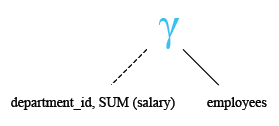
Relational Algebra Expression:

Relational Algebra Tree:
Output:
DEPARTMENT_ID SUM(SALARY)
------------- -----------
          100       51608
           30       24900
                     7000
           90       58000
           20       19000
           70       10000
          110       20308
           50      156400
           80      304500
           40        6500
           60       28800
           10        4400
SQL GROUP BY with COUNT() and SUM() function
The following query displays number of employees, total salary paid to employees work in each department.
Sample table: employees
employee_id  first_name  last_name   email       phone_number  hire_date   job_id      salary      commission_pct  manager_id  department_id
-----------  ----------  ----------  ----------  ------------  ----------  ----------  ----------  --------------  ----------  -------------
100          Steven      King        SKING       515.123.4567  6/17/1987   AD_PRES     24000                                   90
101          Neena       Kochhar     NKOCHHAR    515.123.4568  6/18/1987   AD_VP       17000                       100         90
102          Lex         De Haan     LDEHAAN     515.123.4569  6/19/1987   AD_VP       17000                       100         90
103          Alexander   Hunold      AHUNOLD     590.423.4567  6/20/1987   IT_PROG     9000                        102         60
104          Bruce       Ernst       BERNST      590.423.4568  6/21/1987   IT_PROG     6000                        103         60
105          David       Austin      DAUSTIN     590.423.4569  6/22/1987   IT_PROG     4800                        103         60
106          Valli       Pataballa   VPATABAL    590.423.4560  6/23/1987   IT_PROG     4800                        103         60
107          Diana       Lorentz     DLORENTZ    590.423.5567  6/24/1987   IT_PROG     4200                        103         60
108          Nancy       Greenberg   NGREENBE    515.124.4569  6/25/1987   FI_MGR      12000                       101         100
109          Daniel      Faviet      DFAVIET     515.124.4169  6/26/1987   FI_ACCOUNT  9000                        108         100
...........
206          William     Gietz       WGIETZ      515.123.8181  10/1/1987   AC_ACCOUNT  8300                        205         110
SQL Code:
-- This SQL query calculates the number of employees, total salary, and displays the department code for each department.
-- SELECT statement begins
SELECT
    department_id "Department Code", -- Selects the 'department_id' column and renames it as 'Department Code' in the result set
    COUNT(*) "No of Employees", -- Counts the number of rows for each department and renames the result column as 'No of Employees'
    SUM(salary) "Total Salary" -- Calculates the sum of salaries for each department and renames the result column as 'Total Salary'
FROM
    employees -- Specifies the 'employees' table to retrieve data from
GROUP BY
    department_id; -- Groups the result set by the 'department_id' column
Explanation:
- This SQL code is a SELECT statement that retrieves data from the 'employees' table.
- It calculates the number of employees, total salary, and displays the department code for each department.
- The SELECT clause selects the 'department_id' column from the 'employees' table and renames it as 'Department Code' in the result set.
- The COUNT(*) function counts the number of rows for each department and renames the result column as 'No of Employees'.
- The SUM(salary) function calculates the sum of salaries for each department and renames the result column as 'Total Salary'.
- The GROUP BY clause groups the result set by the 'department_id' column, ensuring that calculations are performed for each unique department.
- The query does not filter or manipulate the data further; it simply retrieves the department code, the number of employees, and the total salary for each department from the 'employees' table.
Output:
Department Code No of Employees Total Salary
--------------- --------------- ------------
            100               6        51608
             30               6        24900
                              1         7000
             90               3        58000
             20               2        19000
             70               1        10000
            110               2        20308
             50              45       156400
             80              34       304500
             40               1         6500
             60               5        28800
             10               1         4400
SQL GROUP BY on more than one columns
The following query displays the department code, job id, total salary paid to employees group by department_id, job_id.
Sample table: employees
employee_id  first_name  last_name   email       phone_number  hire_date   job_id      salary      commission_pct  manager_id  department_id
-----------  ----------  ----------  ----------  ------------  ----------  ----------  ----------  --------------  ----------  -------------
100          Steven      King        SKING       515.123.4567  6/17/1987   AD_PRES     24000                                   90
101          Neena       Kochhar     NKOCHHAR    515.123.4568  6/18/1987   AD_VP       17000                       100         90
102          Lex         De Haan     LDEHAAN     515.123.4569  6/19/1987   AD_VP       17000                       100         90
103          Alexander   Hunold      AHUNOLD     590.423.4567  6/20/1987   IT_PROG     9000                        102         60
104          Bruce       Ernst       BERNST      590.423.4568  6/21/1987   IT_PROG     6000                        103         60
105          David       Austin      DAUSTIN     590.423.4569  6/22/1987   IT_PROG     4800                        103         60
106          Valli       Pataballa   VPATABAL    590.423.4560  6/23/1987   IT_PROG     4800                        103         60
107          Diana       Lorentz     DLORENTZ    590.423.5567  6/24/1987   IT_PROG     4200                        103         60
108          Nancy       Greenberg   NGREENBE    515.124.4569  6/25/1987   FI_MGR      12000                       101         100
109          Daniel      Faviet      DFAVIET     515.124.4169  6/26/1987   FI_ACCOUNT  9000                        108         100
...........
206          William     Gietz       WGIETZ      515.123.8181  10/1/1987   AC_ACCOUNT  8300                        205         110
SQL Code:
-- This SQL query calculates the total salary for each combination of department and job, and displays the department code, job ID, and total salary.
-- SELECT statement begins
SELECT
    department_id "Department Code", -- Selects the 'department_id' column and renames it as 'Department Code' in the result set
    job_id, -- Selects the 'job_id' column
    SUM(salary) "Total Salary" -- Calculates the sum of salaries for each combination of department and job, and renames the result column as 'Total Salary'
FROM
    employees -- Specifies the 'employees' table to retrieve data from
GROUP BY
    department_id, -- Groups the result set by the 'department_id' column
    job_id; -- Groups the result set further by the 'job_id' column
Explanation:
- This SQL code is a SELECT statement that retrieves data from the 'employees' table.
- It calculates the total salary for each combination of department and job and displays the department code, job ID, and total salary.
- The SELECT clause selects the 'department_id' column from the 'employees' table and renames it as 'Department Code' in the result set.
- It also selects the 'job_id' column to display the job ID in the result set.
- The SUM(salary) function calculates the sum of salaries for each combination of department and job.
- The GROUP BY clause groups the result set first by the 'department_id' column and then further by the 'job_id' column, ensuring that calculations are performed for each unique combination.
- The query retrieves the department code, job ID, and total salary for each combination of department and job from the 'employees' table.
Output:
Department Code JOB_ID     Total Salary
--------------- ---------- ------------
            110 AC_ACCOUNT         8300
             90 AD_VP             34000
             50 ST_CLERK          55700
             80 SA_REP           243500
             50 ST_MAN            36400
             80 SA_MAN            61000
            110 AC_MGR            12008
             90 AD_PRES           24000
             60 IT_PROG           28800
            100 FI_MGR            12008
             30 PU_CLERK          13900
             50 SH_CLERK          64300
             20 MK_MAN            13000
            100 FI_ACCOUNT        39600
                SA_REP             7000
             70 PR_REP            10000
             30 PU_MAN            11000
             10 AD_ASST            4400
             20 MK_REP             6000
             40 HR_REP             6500
SQL GROUP BY with WHERE clause
The following query displays the department code, total salary paid to employees group by department_id and manager_id=103.
Sample table: employees
employee_id  first_name  last_name   email       phone_number  hire_date   job_id      salary      commission_pct  manager_id  department_id
-----------  ----------  ----------  ----------  ------------  ----------  ----------  ----------  --------------  ----------  -------------
100          Steven      King        SKING       515.123.4567  6/17/1987   AD_PRES     24000                                   90
101          Neena       Kochhar     NKOCHHAR    515.123.4568  6/18/1987   AD_VP       17000                       100         90
102          Lex         De Haan     LDEHAAN     515.123.4569  6/19/1987   AD_VP       17000                       100         90
103          Alexander   Hunold      AHUNOLD     590.423.4567  6/20/1987   IT_PROG     9000                        102         60
104          Bruce       Ernst       BERNST      590.423.4568  6/21/1987   IT_PROG     6000                        103         60
105          David       Austin      DAUSTIN     590.423.4569  6/22/1987   IT_PROG     4800                        103         60
106          Valli       Pataballa   VPATABAL    590.423.4560  6/23/1987   IT_PROG     4800                        103         60
107          Diana       Lorentz     DLORENTZ    590.423.5567  6/24/1987   IT_PROG     4200                        103         60
108          Nancy       Greenberg   NGREENBE    515.124.4569  6/25/1987   FI_MGR      12000                       101         100
109          Daniel      Faviet      DFAVIET     515.124.4169  6/26/1987   FI_ACCOUNT  9000                        108         100
...........
206          William     Gietz       WGIETZ      515.123.8181  10/1/1987   AC_ACCOUNT  8300                        205         110
SQL Code:
-- This SQL query calculates the total salary for each department where the manager ID is 103, and displays the department code and total salary.
-- SELECT statement begins
SELECT
    department_id "Department Code", -- Selects the 'department_id' column and renames it as 'Department Code' in the result set
    SUM(salary) "Total Salary" -- Calculates the sum of salaries for each department where the manager ID is 103, and renames the result column as 'Total Salary'
FROM
    employees -- Specifies the 'employees' table to retrieve data from
WHERE
    MANAGER_ID = 103 -- Filters the rows where the manager ID is 103
GROUP BY
    department_id; -- Groups the result set by the 'department_id' column
Explanation:
- This SQL code is a SELECT statement that retrieves data from the 'employees' table.
- It calculates the total salary for each department where the manager ID is 103 and displays the department code and total salary.
- The SELECT clause selects the 'department_id' column from the 'employees' table and renames it as 'Department Code' in the result set.
- The SUM(salary) function calculates the sum of salaries for each department where the manager ID is 103.
- The WHERE clause filters the rows where the manager ID is 103.
- The GROUP BY clause groups the result set by the 'department_id' column, ensuring that calculations are performed for each unique department.
- The query retrieves the department code and total salary for each department where the manager ID is 103 from the 'employees' table.
Output:
Department Code Total Salary
--------------- ------------
             60        19800
SQL GROUP BY with HAVING clause
The following query displays the department id, number of employees of those groups that have more than 2 employees:
Sample table: employees
employee_id  first_name  last_name   email       phone_number  hire_date   job_id      salary      commission_pct  manager_id  department_id
-----------  ----------  ----------  ----------  ------------  ----------  ----------  ----------  --------------  ----------  -------------
100          Steven      King        SKING       515.123.4567  6/17/1987   AD_PRES     24000                                   90
101          Neena       Kochhar     NKOCHHAR    515.123.4568  6/18/1987   AD_VP       17000                       100         90
102          Lex         De Haan     LDEHAAN     515.123.4569  6/19/1987   AD_VP       17000                       100         90
103          Alexander   Hunold      AHUNOLD     590.423.4567  6/20/1987   IT_PROG     9000                        102         60
104          Bruce       Ernst       BERNST      590.423.4568  6/21/1987   IT_PROG     6000                        103         60
105          David       Austin      DAUSTIN     590.423.4569  6/22/1987   IT_PROG     4800                        103         60
106          Valli       Pataballa   VPATABAL    590.423.4560  6/23/1987   IT_PROG     4800                        103         60
107          Diana       Lorentz     DLORENTZ    590.423.5567  6/24/1987   IT_PROG     4200                        103         60
108          Nancy       Greenberg   NGREENBE    515.124.4569  6/25/1987   FI_MGR      12000                       101         100
109          Daniel      Faviet      DFAVIET     515.124.4169  6/26/1987   FI_ACCOUNT  9000                        108         100
...........
206          William     Gietz       WGIETZ      515.123.8181  10/1/1987   AC_ACCOUNT  8300                        205         110
SQL Code:
-- This SQL query counts the number of employees in each department and displays the department ID along with the count,
-- but only for departments with more than two employees.
-- SELECT statement begins
SELECT
    department_id, -- Selects the 'department_id' column
    count(*) "No. of Employee" -- Counts the number of rows for each department and renames the result column as 'No. of Employee'
FROM
    employees -- Specifies the 'employees' table to retrieve data from
GROUP BY
    department_id -- Groups the result set by the 'department_id' column
HAVING
    count(*) > 2; -- Filters the grouped results to include only departments with more than two employees
Explanation:
- This SQL code is a SELECT statement that retrieves data from the 'employees' table.
- It counts the number of employees in each department and displays the department ID along with the count.
- The SELECT clause selects the 'department_id' column from the 'employees' table.
- The count(*) function counts the number of rows for each department.
- The GROUP BY clause groups the result set by the 'department_id' column, ensuring that calculations are performed for each unique department.
- The HAVING clause filters the grouped results to include only departments with more than two employees.
- The query retrieves the department ID and the count of employees for each department from the 'employees' table, but only for departments with more than two employees.
Output:
DEPARTMENT_ID No. of Employee
------------- ---------------
          100               6
           30               6
           90               3
           50              45
           80              34
           60               5
Check out our 1000+ SQL Exercises with solution and explanation to improve your skills.
PREV :SQL ORDER BY clause
NEXT : SQL HAVING clause