
SQL SELECT statement
SELECT statement
SQL Select statement tells the database to fetch information from a table.
A query or SELECT statement is a command which gives instructions to a database to produce certain information(s) from the table in its memory.
The SELECT command starts with the keyword SELECT followed by a space and a list of comma separated columns. A * character can be used to select all the columns of a table.
The table name comes after the FROM keyword and a white-space.
Syntax:
SELECT *|{[DISTINCT] column|expression [alias]...}
FROM <table_name>;
Parameters:
| Name | Description |
|---|---|
| * | Specifies all the columns of a table. |
| table_name | Name of the table. |
| column | Column names. |
SQL select all columns
To retrieve all the columns from a table, * character is used with SQL SELECT statement.
Example:
The following query displays all the columns of agents table:
Sample table : agents
+------------+----------------------+--------------------+------------+-----------------+---------+
| AGENT_CODE | AGENT_NAME           | WORKING_AREA       | COMMISSION | PHONE_NO        | COUNTRY |
+------------+----------------------+--------------------+------------+-----------------+---------+
| A007       | Ramasundar           | Bangalore          |       0.15 | 077-25814763    |         |
| A003       | Alex                 | London             |       0.13 | 075-12458969    |         |
| A008       | Alford               | New York           |       0.12 | 044-25874365    |         |
| A011       | Ravi Kumar           | Bangalore          |       0.15 | 077-45625874    |         |
| A010       | Santakumar           | Chennai            |       0.14 | 007-22388644    |         |
| A012       | Lucida               | San Jose           |       0.12 | 044-52981425    |         |
| A005       | Anderson             | Brisban            |       0.13 | 045-21447739    |         |
| A001       | Subbarao             | Bangalore          |       0.14 | 077-12346674    |         |
| A002       | Mukesh               | Mumbai             |       0.11 | 029-12358964    |         |
..........
| A009       | Benjamin             | Hampshair          |       0.11 | 008-22536178    |         |
+------------+----------------------+--------------------+------------+-----------------+---------+
SQL Code:
SELECT * FROM agents;
Explanation:
- SELECT *: This command retrieves all columns from the specified table.
- FROM agents: This specifies the table from which to retrieve the data, in this case, the table named "agents".
To achieve the same result, you can use the following statement :
SQL Code:
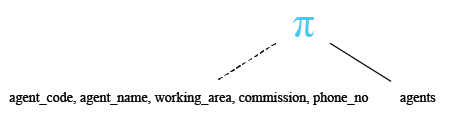
SELECT agent_code, agent_name, working_area, commission, phone_no
-- Select specific columns: agent_code, agent_name, working_area, commission, phone_no
FROM agents;
-- From the table 'agents'
Explanation:
- SELECT agent_code, agent_name, working_area, commission, phone_no: This line specifies the columns that you want to retrieve data from. It selects the columns 'agent_code', 'agent_name', 'working_area', 'commission', and 'phone_no'.
- FROM agents: This line specifies the table from which you want to retrieve data. In this case, it's the 'agents' table.
Relational Algebra Expression:

Relational Algebra Tree:
Output:
AGENT_CODE AGENT_NAME                     WORKING_AREA          COMMISSION PHONE_NO
---------- ------------------------------ --------------------- ---------- -------------
A003       Alex                           London                       .13 075-12458969
A001       Subbarao                       Bangalore                    .14 077-12346674
A009       Benjamin                       Hampshair                    .11 008-22536178
A007       Ramasundar                     Bangalore                    .15 077-25814763
A008       Alford                         New York                     .12 044-25874365
A011       Ravi Kumar                     Bangalore                    .15 077-45625874
A010       Santakumar                     Chennai                      .14 007-22388644
A012       Lucida                         San Jose                     .12 044-52981425
A005       Anderson                       Brisban                      .13 045-21447739
A002       Mukesh                         Mumbai                       .11 029-12358964
A006       McDen                          London                       .15 078-22255588
A004       Ivan                           Torento                      .15 008-22544166
SQL SELECT: specific columns
The SELECT command can be used to fetch specific column(s) from a table.
Example:
To get all values of agent_name, working_area and commission columns from the agents table, the following SQL statement can be used :
Sample table : agents
+------------+----------------------+--------------------+------------+-----------------+---------+
| AGENT_CODE | AGENT_NAME           | WORKING_AREA       | COMMISSION | PHONE_NO        | COUNTRY |
+------------+----------------------+--------------------+------------+-----------------+---------+
| A007       | Ramasundar           | Bangalore          |       0.15 | 077-25814763    |         |
| A003       | Alex                 | London             |       0.13 | 075-12458969    |         |
| A008       | Alford               | New York           |       0.12 | 044-25874365    |         |
| A011       | Ravi Kumar           | Bangalore          |       0.15 | 077-45625874    |         |
| A010       | Santakumar           | Chennai            |       0.14 | 007-22388644    |         |
| A012       | Lucida               | San Jose           |       0.12 | 044-52981425    |         |
| A005       | Anderson             | Brisban            |       0.13 | 045-21447739    |         |
| A001       | Subbarao             | Bangalore          |       0.14 | 077-12346674    |         |
| A002       | Mukesh               | Mumbai             |       0.11 | 029-12358964    |         |
.............
| A009       | Benjamin             | Hampshair          |       0.11 | 008-22536178    |         |
+------------+----------------------+--------------------+------------+-----------------+---------+
SQL Code:
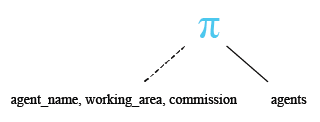
SELECT agent_name, working_area, commission
-- Select specific columns: agent_name, working_area, commission
FROM agents;
-- From the table 'agents'
Explanation:
- SELECT agent_name, working_area, commission: This line specifies the columns that you want to retrieve data from. It selects the columns 'agent_name', 'working_area', and 'commission'.
- FROM agents: This line specifies the table from which you want to retrieve data. In this case, it's the 'agents' table.
Relational Algebra Expression:

Relational Algebra Tree:
Output:
AGENT_NAME                               WORKING_AREA                        COMMISSION
---------------------------------------- ----------------------------------- ----------
Alex                                     London                                     .13
Subbarao                                 Bangalore                                  .14
Benjamin                                 Hampshair                                  .11
Ramasundar                               Bangalore                                  .15
Alford                                   New York                                   .12
Ravi Kumar                               Bangalore                                  .15
Santakumar                               Chennai                                    .14
Lucida                                   San Jose                                   .12
Anderson                                 Brisban                                    .13
Mukesh                                   Mumbai                                     .11
McDen                                    London                                     .15
Ivan                                     Torento                                    .15
SQL SELECT : Using Arithmetic Operators (+, -, *, /) with Employee Salary Calculation
Within SELECT statement you can create an expression with number and field value using arithmetic operators. Here is an example with output:
Sample table : employees
employee_id  first_name  last_name   email       phone_number  hire_date   job_id      salary      commission_pct  manager_id  department_id
-----------  ----------  ----------  ----------  ------------  ----------  ----------  ----------  --------------  ----------  -------------
100          Steven      King        SKING       515.123.4567  6/17/1987   AD_PRES     24000                                   90
101          Neena       Kochhar     NKOCHHAR    515.123.4568  6/18/1987   AD_VP       17000                       100         90
102          Lex         De Haan     LDEHAAN     515.123.4569  6/19/1987   AD_VP       17000                       100         90
103          Alexander   Hunold      AHUNOLD     590.423.4567  6/20/1987   IT_PROG     9000                        102         60
104          Bruce       Ernst       BERNST      590.423.4568  6/21/1987   IT_PROG     6000                        103         60
105          David       Austin      DAUSTIN     590.423.4569  6/22/1987   IT_PROG     4800                        103         60
106          Valli       Pataballa   VPATABAL    590.423.4560  6/23/1987   IT_PROG     4800                        103         60
107          Diana       Lorentz     DLORENTZ    590.423.5567  6/24/1987   IT_PROG     4200                        103         60
108          Nancy       Greenberg   NGREENBE    515.124.4569  6/25/1987   FI_MGR      12000                       101         100
109          Daniel      Faviet      DFAVIET     515.124.4169  6/26/1987   FI_ACCOUNT  9000                        108         100
............
206          William     Gietz       WGIETZ      515.123.8181  10/1/1987   AC_ACCOUNT  8300                        205         110
SQL Code:
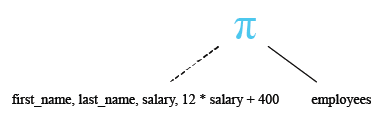
SELECT first_name, last_name, salary, (12*salary + 400)
-- Select specific columns: first_name, last_name, salary, and a calculated expression (12*salary + 400)
FROM employees;
-- From the table 'employees'
Explanation:
- SELECT first_name, last_name, salary, (12*salary + 400): This line specifies the columns that you want to retrieve data from. It selects the columns 'first_name', 'last_name', and 'salary' directly from the 'employees' table. Additionally, it calculates a new value using the expression (12*salary + 400). This expression multiplies the 'salary' by 12, adds 400 to the result, and returns the final value.
- FROM employees: This line specifies the table from which you want to retrieve data. In this case, it's the 'employees' table.
Relational Algebra Expression:

Relational Algebra Tree:
Output:
FIRST_NAME           LAST_NAME                     SALARY (12*SALARY+400)
-------------------- ------------------------- ---------- ---------------
Steven               King                           24000          288400
Neena                Kochhar                        17000          204400
Lex                  De Haan                        17000          204400
Alexander            Hunold                          9000          108400
Bruce                Ernst                           6000           72400
David                Austin                          4800           58000
Valli                Pataballa                       4800           58000
Diana                Lorentz                         4200           50800
Nancy                Greenberg                      12008          144496
Daniel               Faviet                          9000          108400
John                 Chen                            8200           98800
Ismael               Sciarra                         7700           92800
..................................................
SQL SELECT: Using Column Aliases for Employee Details Retrieval
- To renames a column heading temporarily for a particular SQL query you can use column aliases.
- There can be an optional AS keyword between the column name and alias
- It requires double quotation marks if the column name string contains
spaces or special characters or if it is case sensitive.
See the following examples using AS keyword and without AS Keyword.
Sample table : employees
employee_id  first_name  last_name   email       phone_number  hire_date   job_id      salary      commission_pct  manager_id  department_id
-----------  ----------  ----------  ----------  ------------  ----------  ----------  ----------  --------------  ----------  -------------
100          Steven      King        SKING       515.123.4567  6/17/1987   AD_PRES     24000                                   90
101          Neena       Kochhar     NKOCHHAR    515.123.4568  6/18/1987   AD_VP       17000                       100         90
102          Lex         De Haan     LDEHAAN     515.123.4569  6/19/1987   AD_VP       17000                       100         90
103          Alexander   Hunold      AHUNOLD     590.423.4567  6/20/1987   IT_PROG     9000                        102         60
104          Bruce       Ernst       BERNST      590.423.4568  6/21/1987   IT_PROG     6000                        103         60
105          David       Austin      DAUSTIN     590.423.4569  6/22/1987   IT_PROG     4800                        103         60
106          Valli       Pataballa   VPATABAL    590.423.4560  6/23/1987   IT_PROG     4800                        103         60
107          Diana       Lorentz     DLORENTZ    590.423.5567  6/24/1987   IT_PROG     4200                        103         60
108          Nancy       Greenberg   NGREENBE    515.124.4569  6/25/1987   FI_MGR      12000                       101         100
109          Daniel      Faviet      DFAVIET     515.124.4169  6/26/1987   FI_ACCOUNT  9000                        108         100
...........
206          William     Gietz       WGIETZ      515.123.8181  10/1/1987   AC_ACCOUNT  8300                        205         110
SQL Code:
SELECT first_name AS "First Name", last_name AS "Last Name", salary AS "Salary"
-- Select specific columns: first_name, last_name, salary, with aliases for column names
FROM employees;
-- From the table 'employees'
Explanation:
- SELECT first_name AS "First Name", last_name AS "Last Name", salary AS "Salary": This line specifies the columns that you want to retrieve data from. It selects the columns 'first_name', 'last_name', and 'salary' from the 'employees' table. Additionally, it uses the AS keyword to provide aliases for the column names. The aliases are "First Name" for 'first_name', "Last Name" for 'last_name', and "Salary" for 'salary'.
- FROM employees: This line specifies the table from which you want to retrieve data. In this case, it's the 'employees' table.
Output:
First Name           Last Name                     Salary
-------------------- ------------------------- ----------
Steven               King                           24000
Neena                Kochhar                        17000
Lex                  De Haan                        17000
Alexander            Hunold                          9000
Bruce                Ernst                           6000
David                Austin                          4800
Valli                Pataballa                       4800
Diana                Lorentz                         4200
Nancy                Greenberg                      12008
Daniel               Faviet                          9000
John                 Chen                            8200
Ismael               Sciarra                         7700
Jose Manuel          Urman                           7800
Luis                 Popp                            6900
Den                  Raphaely                       11000
Alexander            Khoo                            3100
Shelli               Baida                           2900
Sigal                Tobias                          2800
...................................
SQL Code:
SELECT first_name "First Name", last_name "Last Name", salary "Salary"
-- Select specific columns: first_name, last_name, salary, without using the AS keyword for aliases
FROM employees;
-- From the table 'employees'
Explanation:
- SELECT first_name "First Name", last_name "Last Name", salary "Salary": This line specifies the columns that you want to retrieve data from. It selects the columns 'first_name', 'last_name', and 'salary' from the 'employees' table. Additionally, it uses double quotes to provide aliases for the column names. The aliases are "First Name" for 'first_name', "Last Name" for 'last_name', and "Salary" for 'salary'.
- FROM employees: This line specifies the table from which you want to retrieve data. In this case, it's the 'employees' table.
Output:
First Name           Last Name                     Salary
-------------------- ------------------------- ----------
Steven               King                           24000
Neena                Kochhar                        17000
Lex                  De Haan                        17000
Alexander            Hunold                          9000
Bruce                Ernst                           6000
David                Austin                          4800
Valli                Pataballa                       4800
Diana                Lorentz                         4200
Nancy                Greenberg                      12008
Daniel               Faviet                          9000
John                 Chen                            8200
Ismael               Sciarra                         7700
Jose Manuel          Urman                           7800
Luis                 Popp                            6900
Den                  Raphaely                       11000
Alexander            Khoo                            3100
Shelli               Baida                           2900
Sigal                Tobias                          2800
Guy                  Himuro                          2600
...........................................
SQL SELECT statement with NULL values
Before storing a value in any field of a table, a NULL value can be stored; later that NULL value can be replaced with the desired value. When a field value is NULL it means that the database assigned nothing (not even a zero "0" or blank " " ), in that field for that row.
Since the NULL represents an unknown or inapplicable value, it can’t be compared using the AND / OR logical operators. The special operator ‘IS’ is used with the keyword ‘NULL’ to locate ‘NULL’ values. NULL can be assigned to both types of fields i.e. numeric or character type.
Example:
Sample table: foods+---------+--------------+-----------+------------+ | ITEM_ID | ITEM_NAME | ITEM_UNIT | COMPANY_ID | +---------+--------------+-----------+------------+ | 1 | Chex Mix | Pcs | 16 | | 6 | Cheez-It | Pcs | 15 | | 2 | BN Biscuit | Pcs | 15 | | 3 | Mighty Munch | Pcs | 17 | | 4 | Pot Rice | Pcs | 15 | | 5 | Jaffa Cakes | Pcs | 18 | | 7 | Salt n Shake | Pcs | | +---------+--------------+-----------+------------+
To get data of all columns from the foods table with the following condition -
1. company_id column must contain NULL value,
the following SQL statement can be used:
SQL Code:
SELECT * FROM foods
-- Select all columns
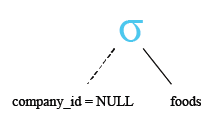
WHERE company_id IS NULL;
-- Filter the results to only include rows where the company_id is NULL
Explanation:
- SELECT * FROM foods: This line specifies the columns that you want to retrieve data from. The asterisk (*) is a wildcard symbol that represents all columns in the table. So, this query selects all columns from the 'foods' table.
- WHERE company_id IS NULL: This line specifies a condition for filtering the results. It filters the results to only include rows where the value in the 'company_id' column is NULL.
Relational Algebra Expression:

Relational Algebra Tree:
Output:
ITEM_ID  ITEM_NAME                 ITEM_UNIT COMPANY_ID
-------- ------------------------- --------- ----------
7        Salt n Shake              Pcs
In the next session, we have discussed Select with distinct and SQL select with distinct on multiple columns in detail.
Check out our 1000+ SQL Exercises with solution and explanation to improve your skills.
PREV : SQL ALTER TABLE
NEXT : SQL DISTINCT