
HTML onchange attribute
onchange
The purpose of the HTML onchange attribute is to indicate the user agent that the value of the element has changed. When the value of the element is changed, if onchange attribute is used, a script is executed.
Supported elements
HTML onchange attribute supports input, select, textarea elements.
Syntax
<ElementName onblur="value" >.....</ElementName>
Where ElementName is any supported element.
Type of value
Script.
Value
A script which is to be executed.
Default value
There is no default value of HTML onchange attribute.
Supported doctypes
HTML 4.01 strict, HTML 4.01 transitional, HTML 4.01 frameset.
Example of HTML onchange attribute with form elements
<!DOCTYPE HTML PUBLIC "-//W3C//DTD HTML 4.01 Transitional//EN" "http://www.w3.org/TR/html4/loose.dtd">
<html>
<head>
<meta http-equiv="Content-Type" content="text/html; charset=iso-8859-1">
<title>Example of HTML onchange attribute with form elements</title>
</head>
<body>
<form name="onchange_example" action="">
Name : <input type="text" name="name" onchange="alert('value of name field is changed')"><br>
<label>Favorite Sports </label>
<select name="favourite_sports" onchange="alert('value of favourite_sports is changed')">
<option value="Soccer">Soccer</option>
<option value="Hockey">Hockey</option>
<option value="Tennis">Tennis</option>
<option value="Golf">Golf</option>
</select><br>
<label>Describe yourself in short : </label>   <br/><textarea cols="10" rows="10" name="describe_ yourself" onchange="alert('value of describe_ yourself is changed')">   </textarea><br>
<button type="button" name="submit">Submit</button>
</form>
</body>
</html>
Result
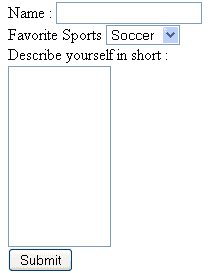
View this example in a separate browser window
Example of HTML onchange attribute with form elements
PREV : HTML onblur attribute
NEXT : onclick, ondblclick, onmousedown event attributes of an HTML element
Test your Programming skills with w3resource's quiz.