
SQL AVG() function
AVG() function
SQL AVG() function calculates the average value of a column of numeric type. It returns the average of all non NULL values
Syntax:
AVG ([ALL | DISTINCT] expression )
DBMS Support: COUNT() function
| DBMS | Command |
| MySQL | Supported |
| PostgreSQL | Supported |
| SQL Server | Supported |
| Oracle | Supported |
DB2 and Oracle Syntax:
AVG ([ALL | DISTINCT] expression ) OVER (window_clause)
Parameters:
| Name | Description |
|---|---|
| ALL | Applies to all values. |
| DISTINCT | Return the sum of unique values. |
| expression | Expression made up of a single constant, variable, scalar function, or column name. The expression is an expression of the exact numeric or approximate numeric data type category, except for the bit data type. Aggregate functions and subqueries are not permitted. |
Syntax diagram - AVERAGE() function

Example:
Sample table: orders
   ORD_NUM ORD_AMOUNT ADVANCE_AMOUNT ORD_DATE  CUST_CODE       AGENT_CODE      ORD_DESCRIPTION
---------- ---------- -------------- --------- --------------- --------------- -----------------
    200114       3500           2000 15-AUG-08 C00002          A008
    200122       2500            400 16-SEP-08 C00003          A004
    200118        500            100 20-JUL-08 C00023          A006
    200119       4000            700 16-SEP-08 C00007          A010
    200121       1500            600 23-SEP-08 C00008          A004
    200130       2500            400 30-JUL-08 C00025          A011
    200134       4200           1800 25-SEP-08 C00004          A005
    200108       4000            600 15-FEB-08 C00008          A004
    200103       1500            700 15-MAY-08 C00021          A005
.........
    200102       2000            300 25-MAY-08 C00012          A012
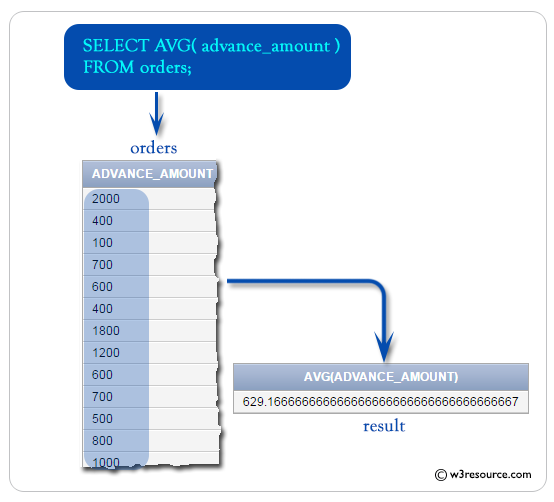
To get the data the average of 'advance_amount' from the 'orders' table, the following SQL statement can be used :
SELECT AVG(advance_amount)  -- Selects the average value of the 'advance_amount' column
FROM orders;  -- Specifies the 'orders' table as the source of data
Explanation:
- SELECT AVG(advance_amount): This is the main part of the SQL query. It uses the AVG() function to calculate the average value of the 'advance_amount' column in the 'orders' table. The result will be a single value representing the average of all values in the 'advance_amount' column.
- FROM orders: This specifies the source of the data for the query, which is the 'orders' table. The FROM keyword is used to indicate the table from which the data will be selected. In this case, it selects data from the 'orders' table.
Output:
AVG(ADVANCE_AMOUNT)
-------------------
         629.166667
Visual Presentation:
SQL AVG() with null
Sample table: customer
+-----------+-------------+-------------+--------------+--------------+-------+-------------+-------------+-------------+---------------+--------------+------------+
|CUST_CODE  | CUST_NAME   | CUST_CITY   | WORKING_AREA | CUST_COUNTRY | GRADE | OPENING_AMT | RECEIVE_AMT | PAYMENT_AMT |OUTSTANDING_AMT| PHONE_NO     | AGENT_CODE |
+-----------+-------------+-------------+--------------+--------------+-------+-------------+-------------+-------------+---------------+--------------+------------+
| C00013    | Holmes      | London      | London       | UK           |     2 |     6000.00 |     5000.00 |     7000.00 |       4000.00 | BBBBBBB      | A003       |
| C00001    | Micheal     | New York    | New York     | USA          |     2 |     3000.00 |     5000.00 |     2000.00 |       6000.00 | CCCCCCC      | A008       |
| C00020    | Albert      | New York    | New York     | USA          |     3 |     5000.00 |     7000.00 |     6000.00 |       6000.00 | BBBBSBB      | A008       |
| C00025    | Ravindran   | Bangalore   | Bangalore    | India        |     2 |     5000.00 |     7000.00 |     4000.00 |       8000.00 | AVAVAVA      | A011       |
| C00024    | Cook        | London      | London       | UK           |     2 |     4000.00 |     9000.00 |     7000.00 |       6000.00 | FSDDSDF      | A006       |
| C00015    | Stuart      | London      | London       | UK           |     1 |     6000.00 |     8000.00 |     3000.00 |      11000.00 | GFSGERS      | A003       |
| C00002    | Bolt        | New York    | New York     | USA          |     3 |     5000.00 |     7000.00 |     9000.00 |       3000.00 | DDNRDRH      | A008       |
| C00018    | Fleming     | Brisban     | Brisban      | Australia    |     2 |     7000.00 |     7000.00 |     9000.00 |       5000.00 | NHBGVFC      | A005       |
| C00021    | Jacks       | Brisban     | Brisban      | Australia    |     1 |     7000.00 |     7000.00 |     7000.00 |       7000.00 | WERTGDF      | A005       |
........
| C00011    | Sundariya   | Chennai     | Chennai      | India        |     3 |     7000.00 |    11000.00 |     7000.00 |      11000.00 | PPHGRTS      | A010       |
+-----------+-------------+-------------+--------------+--------------+-------+-------------+-------------+-------------+---------------+--------------+------------+
To get the data of 'agent_code', sum of 'opening_amt', number of customer for each agent, and 'receive_amt' from the 'customer' table, the following SQL statement can be used :
SELECT agent_code, SUM(opening_amt),  -- Selects the agent code and calculates the sum of opening amounts for each agent
COUNT(*),  -- Calculates the count of rows for each agent
ROUND(SUM(opening_amt) / COUNT(*)) AS MYAVG,  -- Calculates the average opening amount per customer for each agent and rounds it
ROUND(AVG(opening_amt)) AS SQLAVG  -- Calculates the average opening amount for each agent and rounds it
FROM customer  -- Specifies the 'customer' table as the source of data
GROUP BY agent_code;  -- Groups the result set by the agent code
;
Explanation:
- SELECT agent_code, SUM(opening_amt), ...: This is the main part of the SQL query. It selects the 'agent_code' column and calculates the sum of 'opening_amt' for each agent. Additionally, it calculates the count of rows (COUNT(*)) for each agent. Then it calculates two types of averages: MYAVG is calculated by dividing the sum of 'opening_amt' by the count of rows for each agent, and SQLAVG is calculated using the AVG() function directly on the 'opening_amt' column. Both averages are rounded using the ROUND() function.
- FROM customer: This specifies the source of the data for the query, which is the 'customer' table. The FROM keyword is used to indicate the table from which the data will be selected. In this case, it selects data from the 'customer' table.
- GROUP BY agent_code: This clause groups the result set by the 'agent_code' column. The GROUP BY clause is used to aggregate the rows based on the values in the 'agent_code' column. This means that calculations performed in the SELECT statement will be applied separately for each unique value in the 'agent_code' column.
Output:
AGENT_CODE SUM(OPENING_AMT)   COUNT(*)      MYAVG     SQLAVG
---------- ---------------- ---------- ---------- ----------
A002                  22000          3       7333       7333
A004                  25000          3       8333       8333
A007                  16000          2       8000       8000
A009                   6000          1       6000       6000
A011                   5000          1       5000       5000
A012                   5000          1       5000       5000
A010                  22000          3       7333       7333
A001                   8000          1       8000       8000
A008                  13000          3       4333       4333
A006                   8000          2       4000       4000
A005                  19000          3       6333       6333
A003                  12000          2       6000       6000
SQL AVG() with where
Sample table: orders
   ORD_NUM ORD_AMOUNT ADVANCE_AMOUNT ORD_DATE  CUST_CODE       AGENT_CODE      ORD_DESCRIPTION
---------- ---------- -------------- --------- --------------- --------------- -----------------
    200114       3500           2000 15-AUG-08 C00002          A008
    200122       2500            400 16-SEP-08 C00003          A004
    200118        500            100 20-JUL-08 C00023          A006
    200119       4000            700 16-SEP-08 C00007          A010
    200121       1500            600 23-SEP-08 C00008          A004
    200130       2500            400 30-JUL-08 C00025          A011
    200134       4200           1800 25-SEP-08 C00004          A005
    200108       4000            600 15-FEB-08 C00008          A004
    200103       1500            700 15-MAY-08 C00021          A005
........
    200102       2000            300 25-MAY-08 C00012          A012
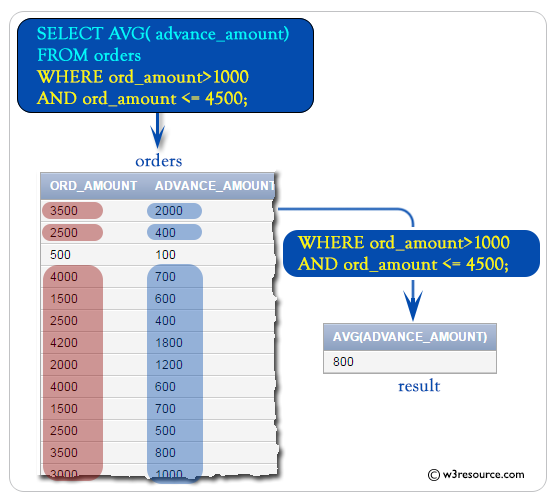
To get the average of 'advance_amount' from the 'orders' table with the following conditions -
1. 'ord_amount' must be more than 1000,
2. and 'ord_amount' must be up to 4500,
the following SQL statement can be used :
SELECT AVG(advance_amount)  -- Selects the average value of the 'advance_amount' column
FROM orders  -- Specifies the 'orders' table as the source of data
WHERE ord_amount > 1000 AND ord_amount <= 4500;  -- Filters the rows to include only those with 'ord_amount' greater than 1000 and less than or equal to 4500
Explanation:
- SELECT AVG(advance_amount): This is the main part of the SQL query. It uses the AVG() function to calculate the average value of the 'advance_amount' column in the 'orders' table. The result will be a single value representing the average of all 'advance_amount' values that meet the specified conditions.
- FROM orders: This specifies the source of the data for the query, which is the 'orders' table. The FROM keyword is used to indicate the table from which the data will be selected. In this case, it selects data from the 'orders' table.
- WHERE ord_amount > 1000 AND ord_amount <= 4500;: This clause filters the rows from the 'orders' table. It restricts the calculation of the average to only include rows where the 'ord_amount' column has values greater than 1000 and less than or equal to 4500. This condition ensures that only orders with amounts within the specified range are considered in the calculation of the average advance amount.
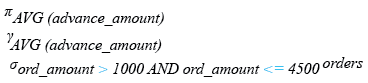
Relational Algebra Expression:
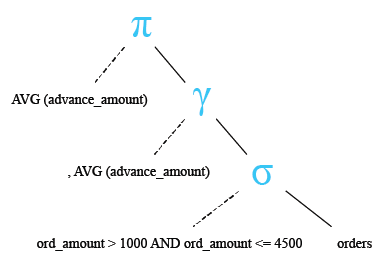
Relational Algebra Tree:
Output:
AVG(ADVANCE_AMOUNT)
-------------------
                800
Visual Presentation:
SQL AVG() with SUM()
Sample table: orders
   ORD_NUM ORD_AMOUNT ADVANCE_AMOUNT ORD_DATE  CUST_CODE       AGENT_CODE      ORD_DESCRIPTION
---------- ---------- -------------- --------- --------------- --------------- -----------------
    200114       3500           2000 15-AUG-08 C00002          A008
    200122       2500            400 16-SEP-08 C00003          A004
    200118        500            100 20-JUL-08 C00023          A006
    200119       4000            700 16-SEP-08 C00007          A010
    200121       1500            600 23-SEP-08 C00008          A004
    200130       2500            400 30-JUL-08 C00025          A011
    200134       4200           1800 25-SEP-08 C00004          A005
    200108       4000            600 15-FEB-08 C00008          A004
    200103       1500            700 15-MAY-08 C00021          A005
    200105       2500            500 18-JUL-08 C00025          A011
.........
    200102       2000            300 25-MAY-08 C00012          A012
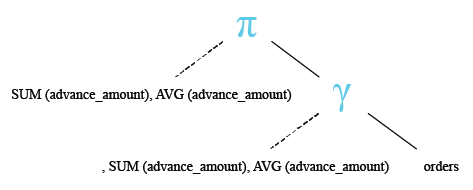
To get the sum of 'advance_amount' and average of 'advance_amount' from the 'orders' table, the following SQL statement can be used :
SELECT SUM(advance_amount), AVG(advance_amount)  -- Selects the sum and average of the 'advance_amount' column
FROM orders;  -- Specifies the 'orders' table as the source of data
Explanation:
- SELECT SUM(advance_amount), AVG(advance_amount): This is the main part of the SQL query. It selects two aggregate functions applied to the 'advance_amount' column of the 'orders' table. The SUM() function calculates the sum of all values in the 'advance_amount' column, while the AVG() function calculates the average value of the 'advance_amount' column. The result will be a single row with two columns: the sum and average of the 'advance_amount' column.
- FROM orders: This specifies the source of the data for the query, which is the 'orders' table. The FROM keyword is used to indicate the table from which the data will be selected. In this case, it selects data from the 'orders' table.
Relational Algebra Expression:

Relational Algebra Tree:
Output:
SUM(ADVANCE_AMOUNT) AVG(ADVANCE_AMOUNT)
------------------- -------------------
              22650          629.166667
Note: Outputs of the said SQL statement shown here is taken by using Oracle Database 10g Express Edition
Here is a slide presentation of all aggregate functions.
Check out our 1000+ SQL Exercises with solution and explanation to improve your skills.
PREV : SUM and COUNT Using Variable and inner join
NEXT : Avg Decimal Places Using Cast within and outside avg