
MySQL Python Connector
Python Connector
MySQL Python connector enables Python programs to access MySQL databases, the connector uses an API which is compliant with the Python Database API Specification. The API is written in pure Python and does not have any dependencies except for the Python Standard Library. The connector provides full support for :
- MySQL functionality
- Connections using TCP/IP sockets and on Unix using Unix sockets.
- Secure TCP/IP connections using SSL.
- Self-contained driver. The connector does not require the MySQL client library or any Python modules outside the standard library.
Python Connector version details :
| Python Connector Version |
MySQL Server Versions |
Python Versions |
|---|---|---|
| 1.1 ( current development series.) | 5.7, 5.6, 5.5 (5.1, 5.0, 4.1) | 3.1 and later, 2.7, 2.6 |
| 1.0 | 5.7, 5.6, 5.5 (5.1, 5.0, 4.1) | 3.1 and later, 2.7, 2.6 (2.5, 2.4) |
Download Python Connector :
The python connector runs on any platform where Python is installed. Python comes preloaded on almost all Linux distribution or Unix-like systems such as Mac OS X and FreeBSD. You can download the latest version of Python Connector binaries and sources from the following website -
http://dev.MySQL.com/downloads/connector/python/.
Install Python Connector on Microsoft Windows
Before installing the Connector on Windows :
- To complete the installation operation, root or administrator privileges may be required.
- Before installing the Python distribution on your system, enable python.exe in Windows %PATH% setting ( path environment variable) or manually add it to, if it is not enabled.
Installing the Windows Connector/ODBC Driver :
Select and download the MSI installer packages from http://dev.MySQL.com/downloads/connector/python/ as per your requirement.
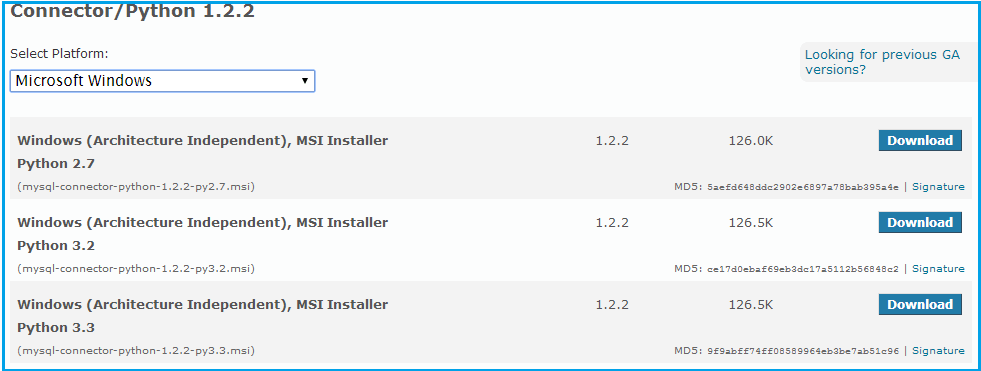
Next, we will install the "Windows (Architecture Independent), MSI Installer, Python 3.2 " connector in a preloaded Windows 7, MySQL 5.6 and Python 3.2.
Now follow the following steps :
Step -1 :
Double click the installer (here it is 'MySQL-connector-python-1.2.2-py3.2.msi')
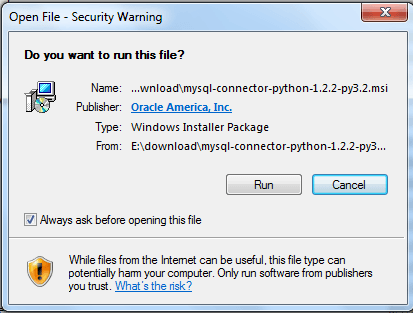
Step -2 :
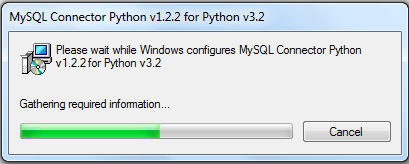
Click on 'Run' and complete the process.
Connecting to MySQL using Python connector
The following example shows how to connect and handle errors to the MySQL server. The connect() constructor creates a connection to the MySQL server and returns a MySQL Connection object. Within the example code, it is stored in the variable 'db'.
#!/usr/bin/python
import MySQL.connector
from MySQL.connector import errorcode


try:
  db = MySQL.connector.connect(user='root', password='datasoft123',
                                host='127.0.0.1', database='sakila')
except MySQL.connector.Error as err:
  if err.errno == errorcode.ER_ACCESS_DENIED_ERROR:
    print("Acess denied/wrong  user name or password")
  elif err.errno == errorcode.ER_BAD_DB_ERROR:
    print("Database does not exists")
  else:
    print(err)
else:
  db.close()
Querying data using Python connector
We want to get the names (first_name, last_name), salary of the employees whose salary greater than the average salary of all department.
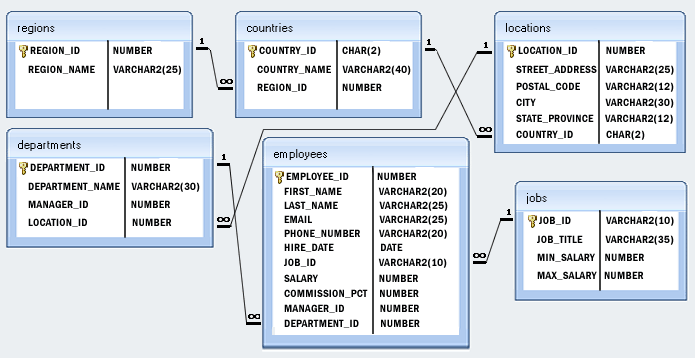
Structure of 'hr' database:
Sample table: employees
| EMPLOYEE_ID | FIRST_NAME | LAST_NAME | PHONE_NUMBER | HIRE_DATE | JOB_ID | SALARY | COMMISSION_PCT | MANAGER_ID | DEPARTMENT_ID | |
|---|---|---|---|---|---|---|---|---|---|---|
| 100 | Steven | King | SKING | 515.123.4567 | 17-Jun-87 | AD_PRES | 24000 | 90 | ||
| 101 | Neena | Kochhar | NKOCHHAR | 515.123.4568 | 21-Sep-89 | AD_VP | 17000 | 100 | 90 | |
| 102 | Lex | De Haan | LDEHAAN | 515.123.4569 | 13-Jan-93 | AD_VP | 17000 | 100 | 90 | |
| 103 | Alexander | Hunold | AHUNOLD | 590.423.4567 | 3-Jan-90 | IT_PROG | 9000 | 102 | 60 | |
| 104 | Bruce | Ernst | BERNST | 590.423.4568 | 21-May-91 | IT_PROG | 6000 | 103 | 60 | |
| 105 | David | Austin | DAUSTIN | 590.423.4569 | 25-Jun-97 | IT_PROG | 4800 | 103 | 60 | |
| 106 | Valli | Pataballa | VPATABAL | 590.423.4560 | 5-Feb-98 | IT_PROG | 4800 | 103 | 60 | |
| 107 | Diana | Lorentz | DLORENTZ | 590.423.5567 | 7-Feb-99 | IT_PROG | 4200 | 103 | 60 | |
| 108 | Nancy | Greenberg | NGREENBE | 515.124.4569 | 17-Aug-94 | FI_MGR | 12000 | 101 | 100 | |
| .............. | ||||||||||
| 206 | William | Gietz | WGIETZ | 515.123.8181 | 7-Jun-94 | AC_ACCOUNT | 8300 | 205 | 110 | |
SQL Code:
SELECT b.first_name,b.last_name
FROM employees b
WHERE NOT EXISTS (SELECT 'X' FROM employees a WHERE a.manager_id = b.employee_id);
Let execute above code in Python 3.2 :
#!/usr/bin/python
import MySQL.connector

db =  MySQL.connector.connect(host="localhost", # Host, usually localhost
                     user="root", # your username
                     password="**********", # your password
                     db="hr") # name of the data base
#create a Cursor object.
cur = db.cursor()

# Write SQL statement here
cur.execute("SELECT b.first_name,b.last_name FROM employees b WHERE NOT EXISTS (SELECT 'X' FROM employees a WHERE a.manager_id = b.employee_id);")

# print all the first and second cells of all the rows
for row in cur.fetchall() :
    print (row[0],row[1])
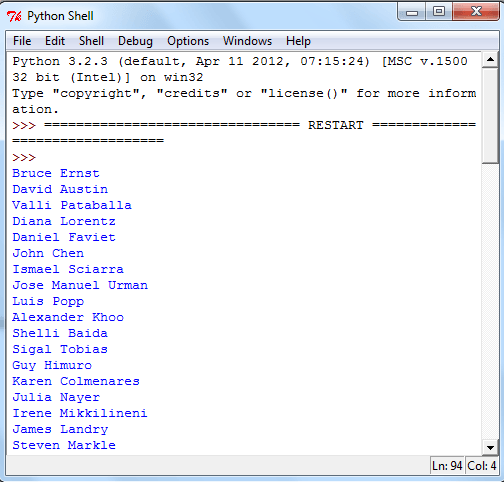
Partial Output:
PREV : MySQL ODBC Connector
NEXT : MySQL Java Connector