
SQLite Exercise: Display the last names of employees having 'e' as the third character
Write a query to display the last names of employees having 'e' as the third character.
Sample table: employees
+-------------+-------------+-------------+----------+--------------------+------------+------------+----------+----------------+------------+---------------+
| EMPLOYEE_ID | FIRST_NAME  | LAST_NAME   | EMAIL    | PHONE_NUMBER       | HIRE_DATE  | JOB_ID     | SALARY   | COMMISSION_PCT | MANAGER_ID | DEPARTMENT_ID |
+-------------+-------------+-------------+----------+--------------------+------------+------------+----------+----------------+------------+---------------+
|         100 | Steven      | King        | SKING    | 515.123.4567       | 1987-06-17 | AD_PRES    | 24000.00 |           0.00 |          0 | 		  90 |
|         101 | Neena       | Kochhar     | NKOCHHAR | 515.123.4568       | 1987-06-18 | AD_VP      | 17000.00 |           0.00 |        100 |            90 |
|         102 | Lex         | De Haan     | LDEHAAN  | 515.123.4569       | 1987-06-19 | AD_VP      | 17000.00 |           0.00 |        100 |            90 |
|         103 | Alexander   | Hunold      | AHUNOLD  | 590.423.4567       | 1987-06-20 | IT_PROG    |  9000.00 |           0.00 |        102 |            60 |
|         104 | Bruce       | Ernst       | BERNST   | 590.423.4568       | 1987-06-21 | IT_PROG    |  6000.00 |           0.00 |        103 |            60 |
|         105 | David       | Austin      | DAUSTIN  | 590.423.4569       | 1987-06-22 | IT_PROG    |  4800.00 |           0.00 |        103 |            60 |
|         106 | Valli       | Pataballa   | VPATABAL | 590.423.4560       | 1987-06-23 | IT_PROG    |  4800.00 |           0.00 |        103 |            60 |
|         107 | Diana       | Lorentz     | DLORENTZ | 590.423.5567       | 1987-06-24 | IT_PROG    |  4200.00 |           0.00 |        103 |            60 |
|         108 | Nancy       | Greenberg   | NGREENBE | 515.124.4569       | 1987-06-25 | FI_MGR     | 12000.00 |           0.00 |        101 |           100 |
|         109 | Daniel      | Faviet      | DFAVIET  | 515.124.4169       | 1987-06-26 | FI_ACCOUNT |  9000.00 |           0.00 |        108 |           100 |
...........
|         206 | William     | Gietz       | WGIETZ   | 515.123.8181       | 1987-10-01 | AC_ACCOUNT |  8300.00 |           0.00 |        205 |           110 |
+-------------+-------------+-------------+----------+--------------------+------------+------------+----------+----------------+------------+---------------+
SQLite Code :
-- Selecting the "last_name" column
SELECT last_name
-- Specifying the table from which to retrieve the data, in this case, "employees"
FROM employees
-- Filtering the results to include only rows where the "last_name" has a length of at least three characters
-- and the second and third characters are 'e'
WHERE last_name LIKE '__e%';
Output:
last_name
----------
Greenberg
Chen
Gee
McEwen
Greene
Lee
Ozer
Abel
Fleaur
Everett
Feeney
Baer
Gietz
Explanation:
The SQLite query retrieves the "last_name" values from the "employees" table but only includes rows where the "last_name" has at least three characters, and the second and third characters are 'e'. The LIKE operator is employed for this pattern matching condition.
Here's a brief explanation of each part of SQLite code:
- SELECT clause:
- It selects the "last_name" column from the "employees" table.
- FROM clause:
- Specifies the table from which to retrieve the data, in this case, the "employees" table.
- WHERE clause:
- Filters the results to include only rows where "last_name" has at least three characters.
- Additionally, it includes only rows where the second and third characters of "last_name" are 'e'.
- The LIKE operator with '__e%' is used for this pattern matching condition, where each underscore represents a single character.
Relational Algebra Expression:
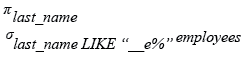
Relational Algebra Tree:
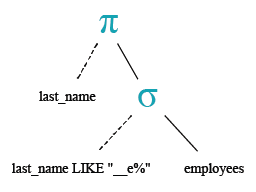
Go to:
PREV : Write a query to display the last names of employees whose names have exactly 6 characters.
NEXT : Write a query to display the jobs/designations available in the employees table.
Practice SQLite Online
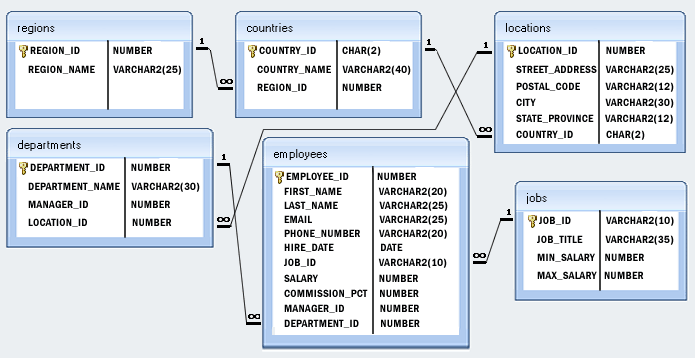
Model Database
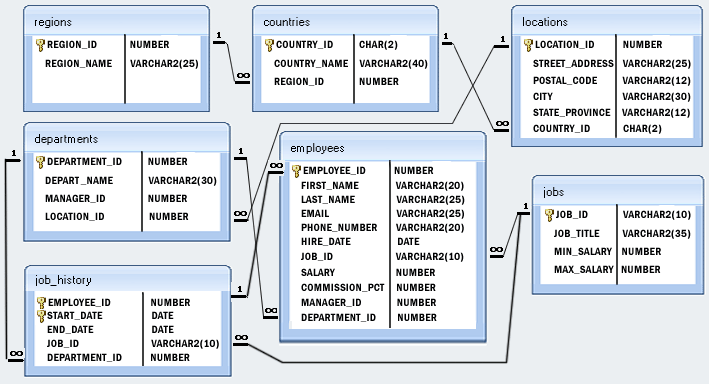
Structure of 'hr' database :
Improve this sample solution and post your code through Disqus.
What is the difficulty level of this exercise?