
SQL Exercises: View to count many customers at each lavel of grade
4. From the following table, create a view that counts the number of customers in each grade.
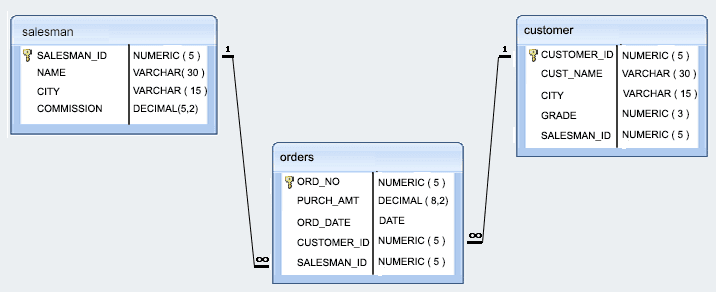
Sample table: Customer
 customer_id |   cust_name    |    city    | grade | salesman_id
-------------+----------------+------------+-------+-------------
        3002 | Nick Rimando   | New York   |   100 |        5001
        3007 | Brad Davis     | New York   |   200 |        5001
        3005 | Graham Zusi    | California |   200 |        5002
        3008 | Julian Green   | London     |   300 |        5002
        3004 | Fabian Johnson | Paris      |   300 |        5006
        3009 | Geoff Cameron  | Berlin     |   100 |        5003
        3003 | Jozy Altidor   | Moscow     |   200 |        5007
        3001 | Brad Guzan     | London     |       |        5005
Sample Solution:
-- Creating a VIEW named 'gradecount' with columns 'grade' and 'number'
CREATE VIEW gradecount (grade, number)

-- Selecting columns 'grade' and the count of rows as 'number' from the 'customer' table
-- Grouping the result by the 'grade' column
AS SELECT grade, COUNT(*)
FROM customer
GROUP BY grade;
output:
sqlpractice=# SELECT *
sqlpractice-# FROM gradecount
sqlpractice-# WHERE number = 2;
 grade | number
-------+--------
       |      2
   200 |      2
   300 |      2
(3 rows)
Code Explanation:
The SQL statement creates a view called "gradecount" that shows the count of customers for each grade.
The specified two columns in the view are "grade" and "number".
It selects the "grade" column and the count of rows for each grade from the "customer" table and groups the results by grade.
Go to:
PREV : View to find the salesmen of the city New York.
NEXT : View to keep track the number of customers ordering.
Inventory database model:
What is the difficulty level of this exercise?
Test your Programming skills with w3resource's quiz.