
SQL Exercise: Employees working in the department who got commission
15. From the following table, write a SQL query to calculate the average salary, the number of employees receiving commissions in that department. Return department name, average salary and number of employees.
Sample table: employees
+-------------+-------------+-------------+----------+--------------------+------------+------------+----------+----------------+------------+---------------+
| EMPLOYEE_ID | FIRST_NAME  | LAST_NAME   | EMAIL    | PHONE_NUMBER       | HIRE_DATE  | JOB_ID     | SALARY   | COMMISSION_PCT | MANAGER_ID | DEPARTMENT_ID |
+-------------+-------------+-------------+----------+--------------------+------------+------------+----------+----------------+------------+---------------+
|         100 | Steven      | King        | SKING    | 515.123.4567       | 2003-06-17 | AD_PRES    | 24000.00 |           0.00 |          0 |            90 |
|         101 | Neena       | Kochhar     | NKOCHHAR | 515.123.4568       | 2005-09-21 | AD_VP      | 17000.00 |           0.00 |        100 |            90 |
|         102 | Lex         | De Haan     | LDEHAAN  | 515.123.4569       | 2001-01-13 | AD_VP      | 17000.00 |           0.00 |        100 |            90 |
|         103 | Alexander   | Hunold      | AHUNOLD  | 590.423.4567       | 2006-01-03 | IT_PROG    |  9000.00 |           0.00 |        102 |            60 |
|         104 | Bruce       | Ernst       | BERNST   | 590.423.4568       | 2007-05-21 | IT_PROG    |  6000.00 |           0.00 |        103 |            60 |
|         105 | David       | Austin      | DAUSTIN  | 590.423.4569       | 2005-06-25 | IT_PROG    |  4800.00 |           0.00 |        103 |            60 |
|         106 | Valli       | Pataballa   | VPATABAL | 590.423.4560       | 2006-02-05 | IT_PROG    |  4800.00 |           0.00 |        103 |            60 |
|         107 | Diana       | Lorentz     | DLORENTZ | 590.423.5567       | 2007-02-07 | IT_PROG    |  4200.00 |           0.00 |        103 |            60 |
|         108 | Nancy       | Greenberg   | NGREENBE | 515.124.4569       | 2002-08-17 | FI_MGR     | 12008.00 |           0.00 |        101 |           100 |
|         109 | Daniel      | Faviet      | DFAVIET  | 515.124.4169       | 2002-08-16 | FI_ACCOUNT |  9000.00 |           0.00 |        108 |           100 |
......
|         206 | William     | Gietz       | WGIETZ   | 515.123.8181       | 2002-06-07 | AC_ACCOUNT |  8300.00 |           0.00 |        205 |           110 |
+-------------+-------------+-------------+----------+--------------------+------------+------------+----------+----------------+------------+---------------+
Sample table: departments
+---------------+----------------------+------------+-------------+
| DEPARTMENT_ID | DEPARTMENT_NAME      | MANAGER_ID | LOCATION_ID |
+---------------+----------------------+------------+-------------+
|            10 | Administration       |        200 |        1700 |
|            20 | Marketing            |        201 |        1800 |
|            30 | Purchasing           |        114 |        1700 |
|            40 | Human Resources      |        203 |        2400 |
|            50 | Shipping             |        121 |        1500 |
|            60 | IT                   |        103 |        1400 |
|            70 | Public Relations     |        204 |        2700 |
|            80 | Sales                |        145 |        2500 |
|            90 | Executive            |        100 |        1700 |
|           100 | Finance              |        108 |        1700 |
......
|           270 | Payroll              |          0 |        1700 |
+---------------+----------------------+------------+-------------+
Sample Solution:
-- Selecting specific columns (department_name, AVG(salary), COUNT(commission_pct)) from the 'departments' table
SELECT department_name, AVG(salary), COUNT(commission_pct)

-- Performing an INNER JOIN between the 'departments' table and the 'employees' table using the common column 'department_id'
FROM departments

JOIN employees USING (department_id)

-- Grouping the result set by the 'department_name' column
GROUP BY department_name;
Sample Output:
department_name		avg		count
Shipping	3475.5555555555555556	45
Sales		8955.8823529411764706	34
IT		5760.0000000000000000	5
Administration	4400.0000000000000000	1
Finance		8600.0000000000000000	6
Purchasing	4150.0000000000000000	6
Marketing	9500.0000000000000000	2
Public Relations10000.0000000000000000	1
Accounting	10150.0000000000000000	2
Executive	19333.333333333333	3
Human Resources	6500.0000000000000000	1
Code Explanation:
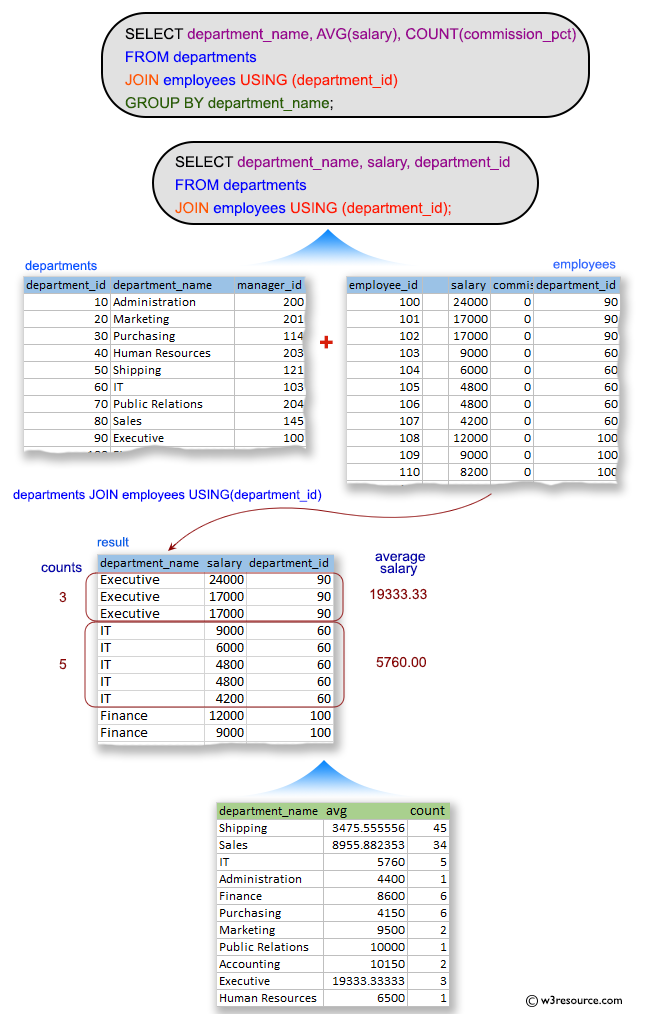
The said query in SQL that retrieves the department name, average salary, and count of employees who receive commission for each department in the company. It does so by joining the 'departments' and 'employees' tables using the department_id column and then grouping the results by the department name.
The uses of JOIN keyword to join the departments and employees tables on their common column, which is "department_id" in this case.
Then groups the results by department name, so that the average salary and count of commission-receiving employees are calculated for each department separately.
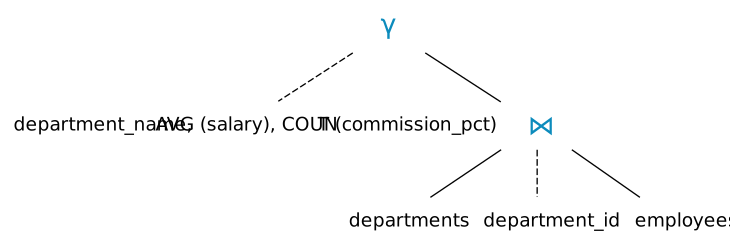
Relational Algebra Expression:

Relational Algebra Tree:
Visual Presentation:
Alternative Solutions:
Using INNER JOIN with Aliases and GROUP BY:
SELECT d.department_name, AVG(e.salary) AS average_salary, COUNT(e.commission_pct) AS commission_count
FROM departments d
JOIN employees e ON d.department_id = e.department_id
GROUP BY d.department_name;
Explanation:
This query also employs an INNER JOIN and provides aliases (d for departments, e for employees). It calculates the average salary and counts the non-null commission percentages foreach department using GROUP BY.
Using INNER JOIN with Explicit Column Names and GROUP BY:
SELECT departments.department_name, AVG(employees.salary) AS average_salary, COUNT(employees.commission_pct) AS commission_count
FROM departments
JOIN employees ON departments.department_id = employees.department_id
GROUP BY departments.department_name;
Explanation:
This one employs an INNER JOIN and specifies column names explicitly. It calculates the average salary and counts the non-null commission percentages for each department using GROUP BY.
Go to:
PREV : Jobs which started between two given dates.
NEXT : Salary differences of employees in the department 80.
Practice Online
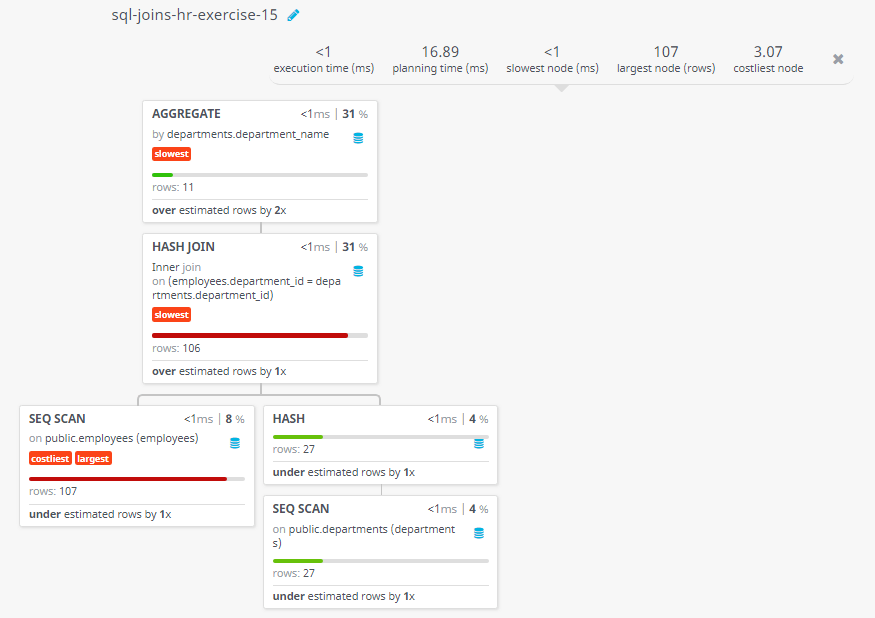
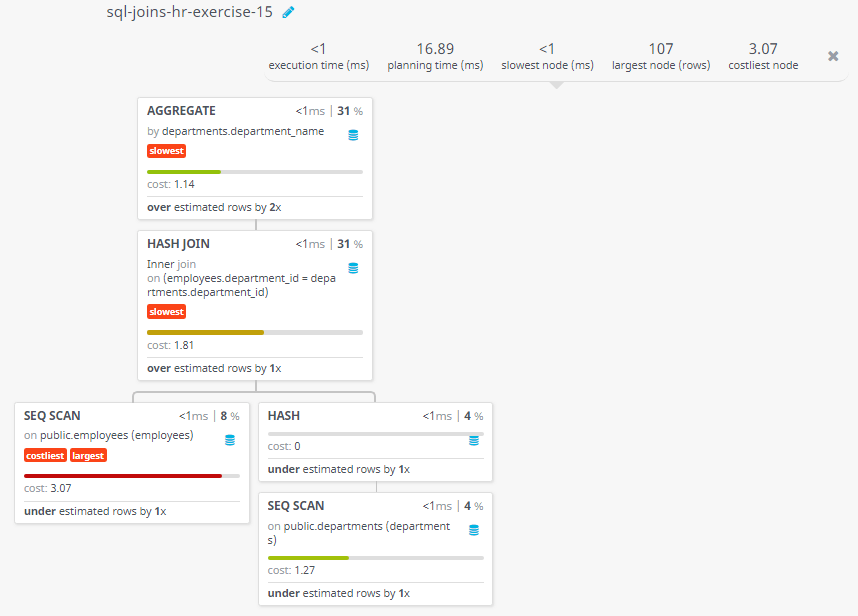
Query Visualization:
Duration:
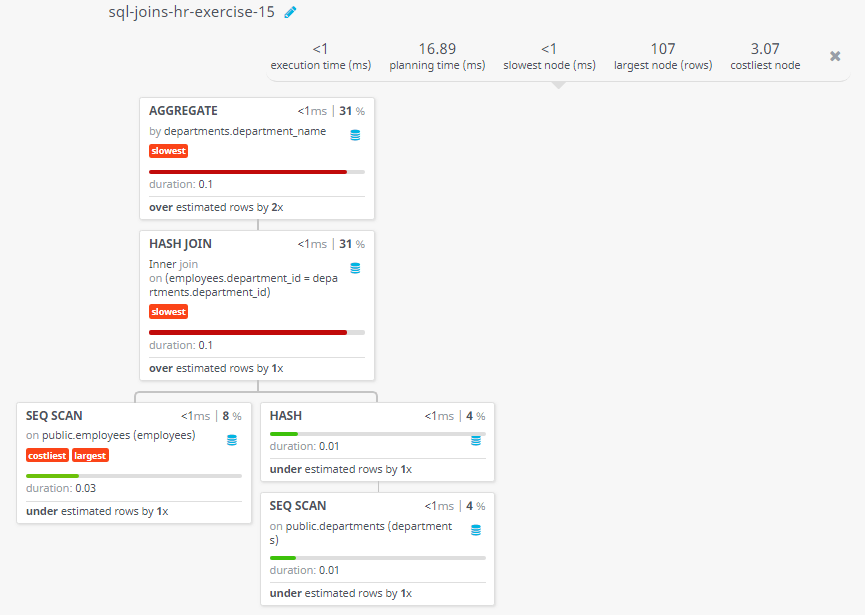
Rows:
Cost:
//------------- this portion above included on 07-02-2025 ------------------------------ var new_txt = 'Based on '+total_submit+' votes, average difficulty level of this exercise is '+difficulty+'.'; //'. '+difficulty+'/3'; var txt_node = document.createTextNode(new_txt); var level_result = document.getElementById('level_result'); level_result.appendChild(txt_node); } } else { alert('There was a problem with the request.'); } } } } function insert_level(event) { event.preventDefault(); var path = window.location; var page = path.href; var page = page.split('?'); var page = page[0]; //console.log(page); //console.log(page); /*var btns = document.getElementsByClassName("mdl-button mdl-js-button mdl-button--raised mdl-button--colored"); for (var i = 0; i < btns.length; i++) { var clicked = btns[i].id; }*/ var clicked = this.id; if(clicked=="easy") clicked=1; if(clicked=="medium") clicked=2; if(clicked=="hard") clicked=3; console.log(clicked); var httpRequest1 = new XMLHttpRequest(); if (!httpRequest1) { alert('Giving up :( Cannot create an XMLHTTP instance'); //return false; } var url = "/assets/level_insert.php"; var data1 = "level=" + clicked + "&page=" + page; httpRequest1.onreadystatechange = displayContent1; httpRequest1.open("POST", url, true); httpRequest1.setRequestHeader("Content-Type", "application/x-www-form-urlencoded"); httpRequest1.send(data1); console.log(data1); //console.log("found"); function displayContent1(responseText) { if (httpRequest1.readyState === XMLHttpRequest.DONE) { if (httpRequest1.status === 200) { var op = httpRequest1.responseText; console.log(op); } else { alert('There was a problem with the request.'); } } } } var easy = document.getElementById("easy"); easy.addEventListener('click', insert_level, false); var medium = document.getElementById("medium"); medium.addEventListener('click', insert_level, false); var hard = document.getElementById("hard"); hard.addEventListener('click', insert_level, false);
Test your Programming skills with w3resource's quiz.